Showing posts with label iphone. Show all posts

Thursday, September 19, 2019

September 19, 2019

IOS 13 Update: Full Features, Supported Devices, and Everything !


Apple officially announced the new iOS 13, which comes this year with many features and improvements at many levels to improve the experience of use on iPhone, iPad and iPod Touch. In this article view all the details of the new iOS 13!


new iOS 13

IOS 13 .. Better performance and smaller updates!

  • Face ID is 30% faster
  • Reduce app updates to about 60%
  • Applications are twice as fast at startup. 


Face ID is 30% faster


IOS 13 .. Night Mode finally came!

Night mode is finally available in iOS with iOS 13 update and on a very wide level throughout the system and its interfaces as well as on the main applications in the system: keyboard, messages, notes, maps, reminders, music and others. For more on the night mode in iOS 13 and how to activate it and the form of applications after activation.

 Night Mode finally came!

 Night Mode finally came!

 Night Mode finally came!

 Night Mode finally came!


Music application


  •  Night mode feature 
  • Show words and chronologically match the song you are listening to

keyboard

  • A new way of writing over dragging on characters is called Quick Path
  •  New fonts for in-app use are now available on the App Store 

A new way of writing over dragging on characters is called Quick Path


 Maps application


  •  Full map coverage of the United States with new features in view and location sharing
  • Look Around or Street View in Google Maps
 
 Maps application

 Maps application


Privacy

 There is a new privacy settings section in iOS 13. From which you can control which apps follow your location, give you a report of which apps are tracking your data in the background, as well as Wi-Fi and Bluetooth security features.

Also like Facebook and Google, you will be able to register to sites and services through your Apple account through the Sign in with Apple feature, which will create a new random account every time without disclosing any personal information about you.

Sign in with Apple feature

 Messages

 Memoji got new character options, added cosmetics and accessories to it and controlled all aspects of the characters. It is also possible to create stickers from them and will be available on devices running A9 processor and later.

Memoji


Photo and camera application

  • New Portrait lighting effect with intensity control 
  • New image editor interface in the system with new features like noise reduction and automatic optimization.
  • Enhanced video editor with new features such as the ability to rotate video
  • New improvements to the image view in Photos.
  • Photo app has the ability to remove repetitive images like screen shots.

Photo and camera application

Photo and camera application

Photo and camera application


Reminders program

  • The Reminders app has been redesigned for easy creation of tasks and appointments, arranging them into lists and further integrating with Siri. 

    Reminders app

     AirPods headphones

    • Siri can read incoming messages and the user can reply to them through the speakers. 
      Audio Sharing to share what you hear with someone else with AirPods. 
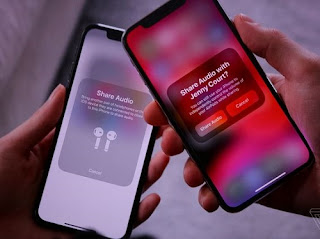
      AirPods headphones
       

    the battery

    • A new feature in iOS 13, known as Optimized Battery Charging, aims to increase long-term battery life by protecting it from overcharging.

    Gamers

    • If you are a gamer on the PlayStation or Xbox platform and have one in your home, you will be able to stream games to your iPhone or iPad and continue playing wherever you go around the house. IOS 13 also supports connecting your device to the Dual Shock 4 game controller for the PlayStation 4 or the Xbox controller.

    IPhone phones supporting iOS 13 

    IPhone phones supporting iOS 13


    iPadOS: The new name for iOS for iPad

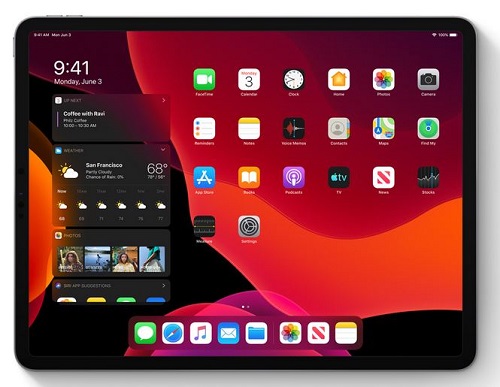
    iPadOS is the new name for the iPad operating system and it carries all the basic features of the previously mentioned iOS system in addition to many other new features designed specifically for iPads, which include the following:

    • Add widgets to your home screen 
    • Run more than one window for the same application on the screen
    • Browse links by long press
    • Browse files stored on external storage devices when connected to iPad.
    • Floating windows feature: Some applications can partially appear floating on the screen while working on another application, and the floating application can be changed by dragging.
    • The File Manager application can browse files as columns.
    • File sharing via iCloud Drive
    • ZIP file compression and decompression
    • Improvements to the Safari browser to approximate desktop version: Download Manager, the ability to customize settings for a standalone site, control the font size, automatically optimize the sites to become more suitable for iPad
    • Accelerate the response to Apple's pen by twice.
    • External Storage Support: Now you can connect your USB flash drive, flash drive or SD reader to your iPad via USB-C

     
    iPadOSiPadOS

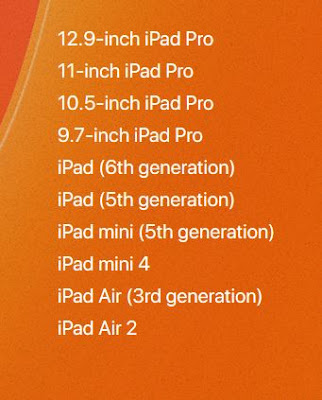
    IPads compatible with iPadOS

    IPads compatible with iPadOS

     IOS 13 / iPadOS update launch date

    There is a time plan to follow for iOS 13 / iPadOS updates, first for developers and then for Apple's beta subscribers.

    Do you want to watch the full Apple conference ?! 

    You can view the entire conference, which lasted for two hours and a third of the hour on the official Apple website through this link. The video contains the official review of all the things announced by Apple: iOS 13, iPadOS, watchOS 6 and other things.


September 19, 2019

Here are the 10 best smartphones in photography and cameras.

After the release of many new smartphones from various international companies, the platform "DxOMark" presented the ranking of the most important smartphones in the field of photography and cameras. It comes with the specifications that this phone comes with.


iphone phone


DxOMark is the "industry standard" for evaluating the image quality of smartphones and cameras. This assessment is done through DxOMark's extensive testing protocol, which combines objective laboratory measurements with analysis that includes hundreds of images per smartphone in different conditions. Although image quality is a subjective subject, and photography also depends on the variables of the scene to be captured, DxOMark points are an attempt to simplify and bring consumers closer to important stats to find out the best cameras in smartphones.

samsung phone

The Galaxy Note 10+ is equipped with a triple main camera unit with a 12-megapixel (OIS) sensor, 12-megapixel (dual zoom, OIS) and 16-megapixel (123 °) sensor, which also complements the ToF sensor. Among the strengths of the camera, experts noted fast and accurate autofocus, low flow level, as well as excellent color details.

The Huawei P30 Pro is, second, one point apart, of course, because of the P30 Pro telescope lens that gives a remarkable 5x optical zoom, approximate 10x hybrid, and a stunning 50x digital zoom.The Huawei Super Spectrum sensor has a 1 / 1.7 inch size, Its ability to capture light in a radically different way.The RYYB color sensor deviates from the traditional RGBG Bayer filter by replacing green pixels with high-quality yellow pixels, raising the ISO rate to a maximum value of 409,600 on the HUAWEI P30 Pro and 204800 on the HUAWEI P30.

The rest of the other phones came as the following picture:

list


Monday, September 16, 2019

September 16, 2019

iPhone 11 and Note 10 Plus .. Which is better?

Once the new iPhones are announced, technology experts will start comparing Apple devices with their Samsung counterparts.

iPhone 11 and Note 10 Plus .. Which is better?


After the latest iPhone was unveiled recently at a ceremony in California, comparisons were made with the Galaxy Note 10 Plus, which has a long battery life.

The Galaxy Note 10 Plus offers three powerful cameras, and is hardly smart. Fast shipping.
The iPhone 11 Pro Max is Apple's most powerful phone to date, betting on the power of a triple camera and a battery that lasts a whole day, but the user is required to pay money if he wants to get an extra margin of storage.

On the price level, we find that the two devices are very close, the phone "iPhone 11 Pro Max", will be sold for $ 1099 dollars, while the phone "Note 10" for $ 1100 on the site "Amazon".
The similarity in the two phones also applies to the camera because they both include three advanced cameras, and this is very important at the moment, because users focus heavily on the issue of photography.

And the phone "Galaxy Note 10 Plus" in the issue of storage, because it allows the possibility of extending the storage space up to 256 GB, which is not available in the "Apple" which requires you to pay from a limited capacity does not exceed 64 GB, according to the site Android Central.


The strength of Apple, is that the phone "iPhone 11 Pro Max" is equipped with chip technology which is a SIM card installed inside the phone, and this, relieves the user of the hardship of removing the chip whenever he wants to change the number, thanks to the possibility Modify the information stored on them, which is useful for those who travel frequently and have to change segments.

If you are accused of design, the Galaxy Note 10 Plus comes with a new touch with a fully customizable screen interface, with the exception of a small hole in the top that is dedicated to the camera, while the new iPhone is almost identical to the iPhone XS Max, Enhanced with glass and triple camera protrusion.

With the "Galaxy Note 10 Plus" rarely, Apple introduced its new phone without this accessory, which was possible, and experts said that the founder of "Apple" Steve Jobs, had promised not to add the pen to the device, because he believes that the finger Is the best pen possible.

The Note 10 Plus is outstanding in terms of battery, whether wired charging up to 45 watts or via wireless charging of 15 watts, but not much different from the wireless charging capacity of the "iPhone" of 18 watts.


Saturday, September 14, 2019

September 14, 2019

Photography tips for iPhone user to be be professional photographer


if you are an iPhone user And you need the best ideas to edit your photos. You have reached the right place.in this guide. I will give you 5 photography tips for iPhone user to make your photos look amazing and admirable


Man photographing sea with mobile phone

IPhone has one of the best camera dimensions in the history of smartphones, many people use these dimensions to take pictures , because They are easier and more efficient than the dimensions of the huge camera. And can give you the perfect picture for your social media platforms .

Using iphone for photography and taking the picture is hardly enough to get the result you want. Getting excellent photo editing tools and apps is vital and somehow. You will have to retouch your image for perfection Photo editing with your iPhone can be very awful.

Photo editing is a combination of the best photo editing apps and photoshop apps choosing the app is only part of the qualifiers, There's a lot to look for more than just apps.


Woman photographing city with mobile phone at dusk
 

1. Take good photos


The first thing you need to keep in mind is taking the perfect photos. You may think that the photo editing process will help you. There is no magic trick in editing that will turn the badly captured face into beautiful. Photography using iPhone should focus on perfect photos first. Editing is just to remove or add some things to blend or cover other things. In some cases, editing will ruin your image if you don't get it right

2- Don't edit your photo without knowing what you want


You need to keep in mind what you want the final image to look like. You can't edit without understanding what you want to achieve. Look at the picture and decide how much adjustments you want to make. Is it an adjustment for exposure or color? Is it a modification of the pieces that will give you the final image? Or do you just want to remove some distracting elements from your image? All of these things can't be done at the same time. Planning adds value to your creativity. Using filters and random effects on images makes them less annoying.

3- Carefully select your editing application


There are many editing apps on the app store. This is one of the resources on the iPhone that you should know how to use. Because many of these apps will cost you nothing even. However, many beginners download many apps. The secret here is to select some great apps and focus on them. One app with everything you need can be better than ten apps with different features. Snapseed and PhotoToaster are the most recommended apps. Each one has unique features that you can combine to create the perfect picture.

 4. Specialized apps begin to enter The more you edit your photos.


The more you grow in terms of curiosity and experience, you may need to bring specialized apps while developing your unique style Applications like Lenslight ($ 4.99) and Alien Sky ($ 4.99) are great options.

5. Use the filter


Don't use filters just because they are there. Sometimes you may not need them. You will only get images with the same look without any uniqueness. Applications with custom filters like Snapseed or PhotoToaster can be great for you. You can edit DSLR images on your iPhone using apps. IPhone Editing Digital SLRs Apply this to your advantage whether you're editing on the body or face only. Believe me after you follow these tips.


For more topics click here