Showing posts with label Tech Inc. Show all posts

Thursday, September 19, 2019

September 19, 2019

IOS 13 Update: Full Features, Supported Devices, and Everything !


Apple officially announced the new iOS 13, which comes this year with many features and improvements at many levels to improve the experience of use on iPhone, iPad and iPod Touch. In this article view all the details of the new iOS 13!


new iOS 13

IOS 13 .. Better performance and smaller updates!

  • Face ID is 30% faster
  • Reduce app updates to about 60%
  • Applications are twice as fast at startup. 


Face ID is 30% faster


IOS 13 .. Night Mode finally came!

Night mode is finally available in iOS with iOS 13 update and on a very wide level throughout the system and its interfaces as well as on the main applications in the system: keyboard, messages, notes, maps, reminders, music and others. For more on the night mode in iOS 13 and how to activate it and the form of applications after activation.

 Night Mode finally came!

 Night Mode finally came!

 Night Mode finally came!

 Night Mode finally came!


Music application


  •  Night mode feature 
  • Show words and chronologically match the song you are listening to

keyboard

  • A new way of writing over dragging on characters is called Quick Path
  •  New fonts for in-app use are now available on the App Store 

A new way of writing over dragging on characters is called Quick Path


 Maps application


  •  Full map coverage of the United States with new features in view and location sharing
  • Look Around or Street View in Google Maps
 
 Maps application

 Maps application


Privacy

 There is a new privacy settings section in iOS 13. From which you can control which apps follow your location, give you a report of which apps are tracking your data in the background, as well as Wi-Fi and Bluetooth security features.

Also like Facebook and Google, you will be able to register to sites and services through your Apple account through the Sign in with Apple feature, which will create a new random account every time without disclosing any personal information about you.

Sign in with Apple feature

 Messages

 Memoji got new character options, added cosmetics and accessories to it and controlled all aspects of the characters. It is also possible to create stickers from them and will be available on devices running A9 processor and later.

Memoji


Photo and camera application

  • New Portrait lighting effect with intensity control 
  • New image editor interface in the system with new features like noise reduction and automatic optimization.
  • Enhanced video editor with new features such as the ability to rotate video
  • New improvements to the image view in Photos.
  • Photo app has the ability to remove repetitive images like screen shots.

Photo and camera application

Photo and camera application

Photo and camera application


Reminders program

  • The Reminders app has been redesigned for easy creation of tasks and appointments, arranging them into lists and further integrating with Siri. 

    Reminders app

     AirPods headphones

    • Siri can read incoming messages and the user can reply to them through the speakers. 
      Audio Sharing to share what you hear with someone else with AirPods. 
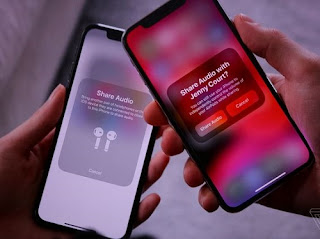
      AirPods headphones
       

    the battery

    • A new feature in iOS 13, known as Optimized Battery Charging, aims to increase long-term battery life by protecting it from overcharging.

    Gamers

    • If you are a gamer on the PlayStation or Xbox platform and have one in your home, you will be able to stream games to your iPhone or iPad and continue playing wherever you go around the house. IOS 13 also supports connecting your device to the Dual Shock 4 game controller for the PlayStation 4 or the Xbox controller.

    IPhone phones supporting iOS 13 

    IPhone phones supporting iOS 13


    iPadOS: The new name for iOS for iPad

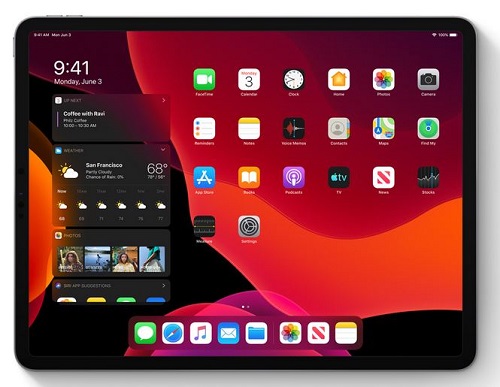
    iPadOS is the new name for the iPad operating system and it carries all the basic features of the previously mentioned iOS system in addition to many other new features designed specifically for iPads, which include the following:

    • Add widgets to your home screen 
    • Run more than one window for the same application on the screen
    • Browse links by long press
    • Browse files stored on external storage devices when connected to iPad.
    • Floating windows feature: Some applications can partially appear floating on the screen while working on another application, and the floating application can be changed by dragging.
    • The File Manager application can browse files as columns.
    • File sharing via iCloud Drive
    • ZIP file compression and decompression
    • Improvements to the Safari browser to approximate desktop version: Download Manager, the ability to customize settings for a standalone site, control the font size, automatically optimize the sites to become more suitable for iPad
    • Accelerate the response to Apple's pen by twice.
    • External Storage Support: Now you can connect your USB flash drive, flash drive or SD reader to your iPad via USB-C
     
    iPadOSiPadOS

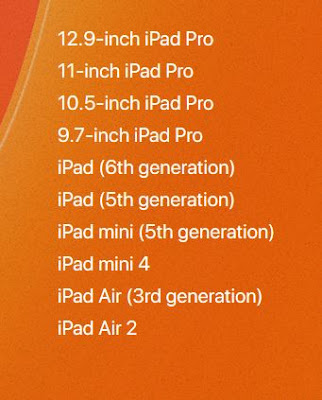
    IPads compatible with iPadOS

    IPads compatible with iPadOS

     IOS 13 / iPadOS update launch date

    There is a time plan to follow for iOS 13 / iPadOS updates, first for developers and then for Apple's beta subscribers.

    Do you want to watch the full Apple conference ?! 

    You can view the entire conference, which lasted for two hours and a third of the hour on the official Apple website through this link. The video contains the official review of all the things announced by Apple: iOS 13, iPadOS, watchOS 6 and other things.


September 19, 2019

Here's how to turn your Android phone into a computer

If you want to turn your Android device into a fully functional computer, you can search among a lot of operating system apps there are basically 3 operating system apps you can do this easily by connecting your Android device to a screen or TV using a mouse and keyboard.


 How to turn your Android phone into a computer using Sentio Desktop for Android versions (Lollipop, Marshmallow).


The free public data for the Sentio Desktop operating system for Android versions (Lollipop, Marshmallow) is limited in time but works perfectly on a Snapdragon 800 processor or when there is an external p1080 display and a 2GB RAM processor.

At least Android version Lollipop (a version of the Android mobile operating system developed by Google) or later versions of Android is required for it to work properly.

Step 1: Download and install the Sentio Desktop app on your Android device.

Step 2: Once installed, grant the application access, and click OK

Step 3: To grant access to the notification, grant access to your phone's notification Step

 4: When you see the home screen on the Sentio Desktop operating system, click the "OK" step

 5: The Sentio Desktop has been turned on and you can see it on the notification panel to launch it.

How to turn your Android phone into a PC using UI Leena Desktop


Use the UI Leena Desktop app: is a multiple window where you can bring your desktop operating system to your Android device and expand your Android system through the original desktop user interface and Leena Desktop turns your Android phone into a desktop-like environment

Step 1: Download and install Leena Desktop UI

Step 2: Then open the application and see the step screen

 Step 3: Allow Leena Player to access the media, photos, and files on your device

 Step 4: When you can see the full desktop experience, tap Settings in the left corner of the screen to set everything according to your desire

 Step 5: Open the application or files in multi-window mode It integrates the Android ecosystem as an integrated desktop operating system

How to turn your Android phone into a PC using Sentio Desktop


Important note: Sentio Desktop for Android (Lollipop, Marshmallow) differs from Sentio Desktop for Android 7.0 and above. Both have the same name but each has a different Android version.

Use Sentio Desktop: Sentio Desktop turns your smartphone or tablet into a PC by adding a whole new layer of beautiful UI / desktop to your Android phone. You'll get all the desktop features you know and love along with the vicissitudes of mobile devices that take Android OS to the next level

Step 1: Download and install the Sentio Desktop app on your smartphone

 Step 2: Open the app and fill the step screen

 Step 3: Press the "Start Shift" button step

 Step 4: Grant the Overlay and Developer permission to see the interface on your mobile phone

 Step 5: Go to Start menu from Sentio application and get multi-step windows support

 Step 6: Go to Quick Setup to control flash light, sounds, grid, and hotspot

 So simply this is how you can turn your Android phone into a fully functional PC using 3 OS apps
September 19, 2019

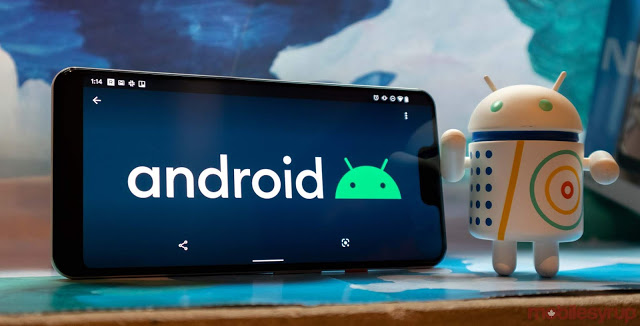
A list of samsung smartphones that will upgrade to Android 10

A list of Samsung devices has appeared on the web and all M smartphones are still on, as well as most of the devices released in 2018 and 2019.

 android 10


According to the published list will not be updated - Galaxy S8, Galaxy S8 + and Galaxy Note 8+. The same goes for the Galaxy A8 +, A6s, A8s, A7 2018, A40s, J4 Core, J2 Core, J2 Pro and J7 Prime 2.

The list does not indicate exactly when the update will reach certain devices. But we can safely assume that Samsung's flagship phone Galaxy S10, S10 +, S10e, Galaxy Note10 and Note10 + will be the first devices to be updated to Android 10.


This is the full list:


the list

Monday, September 16, 2019

September 16, 2019

Trump receives shocking warning about Huawei


US President Donald Trump faces more challenge in his decisions on Huawei, but this time the challenge did not come from the Chinese city of Shenzhen, where Huawei is based, but from a place much closer to the White House .. from Microsoft.

Trump receives shocking warning about Huawei


Microsoft's president and chief legal officer, Brad Smith, has accused his government of being non-American in its dealings with the Chinese technology giant and that it should be allowed to buy US technology. He has sought support for Huawei's restoration of its US supply chain.


In an interview with Bloomberg BusinessWeek, Smith suggested that action against Huawei should be reconsidered to ensure that anything done has a "sound basis in reality, logic and the rule of law," explaining that the rationale for US restrictions is fragile and discouraging. In inference. "


"What we get in return is that they (the US administration) tell us if you know what we know, you will agree with us, and our answer is," Great, show us what you know so we can decide for ourselves, "he said. This is how this country works. "


Smith directly criticized Trump himself about the situation with Huawei, and linked what is happening in the technology industry with what could happen in the hotel sector, which Trump has more knowledge. Chips, like telling a hotel company that they can open their doors but cannot put beds in hotel rooms or food in their restaurant, either way you endanger the survival of that company. "


According to the Forbes news site, September will be an important month for Huawei, which is preparing to start a life without the US technology that built its business around. As David Phelan noted in a Forbes article a few days ago, all eyes are on the imminent launch of the Mate 30 series to see how Huawei plans to launch new products despite US restrictions.


It is hard to imagine an Android smartphone targeting the international market but lacks Gmail, Google Maps and access to the Google Play Store, but that is where Huawei found itself.


Smith's warning, which will be welcomed in Shenzhen, is that there will be material consequences for the global technology sector as a result of the US confrontation with Huawei and the consequent resource constraints, which will hit American companies severely. He argues that before any action is taken, the effects should be carefully evaluated.


Of course, Huawei will take the biggest blow with the loss of American technology from Google, but Google is also rallying, as has been reported, toward a softer US position


For more topics click here  
.