Showing posts with label features. Show all posts

Friday, September 20, 2019

September 20, 2019

Huawei Mate 30 Pro officially unveiled - full specifications and details!

Finally, after a wide range of leaks and speculation Huawei has now officially unveiled the flagship distinctive Huawei Mate 30 Pro with a host of features that qualify him directly to compete iPhone 11 Pro and Galaxy Note 10.
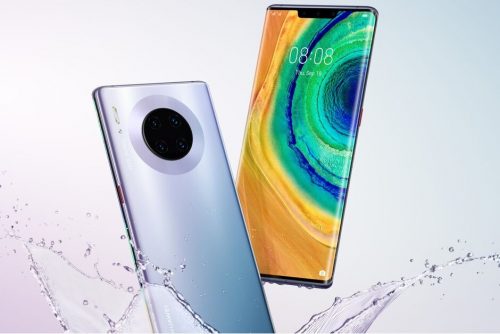
Huawei Mate 30

Camera Huawei Mate 30 Pro

Huawei Mate 30 Pro offers one of the most impressive cameras of 2019, where the phone along with the 40-megapixel Super Sensing camera on the P30 Pro, a 40-megapixel wide-angle camera is also called the company Cine, and can both cameras using the sensor 3D ToF Record videos with complete background isolation.

Camera Huawei Mate 30 Pro


Both cameras are relatively large, with the main camera having a 1 / 1.7 sensor and f / 1.6 aperture, while the Cine camera has a 1 / 1.54-inch sensor and an ultra-wide lens with f / 1.8 aperture.
The third camera on the back of the phone is an 8-megapixel camera with 3x optical zoom (80mm focal length) and 5x optical hybrid zoom, with OIS.

The video recording technology on the Mate 30 Pro is the most distinctive on Huawei phones, where the device supports 4K video shooting 60fps and support slow shooting at 7680 frames per second, and the most outstanding thing is the possibility of shooting 4K resolution HDR +.

3D facial recognition feature and remote phone control

Talking about the front camera unit of the Huawei Mate 30 Pro, we are in front of a high-resolution unit with a set of features that combine the most prominent features of the camera phones leading in one device. 

3D facial recognition feature and remote phone control


The front camera comes with a 32-megapixel camera, supports FHD + video recording (2288 x 1080 pixels) with support for a range of distinct shooting modes.

A new 3D scanner from Huawei introduces Face Unlocking technology, which has been improved more than last year to compete strongly with Apple's Face ID technology.

Also, Huawei has not abandoned the built-in fingerprint sensor at the bottom of the screen, but developed and improved to become faster than any other phone.

The surprise was the presence of a dedicated Gesture sensor to recognize gestures remotely, a blow to Motion Sense feature that Google is preparing to launch in Pixel 4 next month.

The presentation of the Mate 30 Pro included a review of this feature, with a hand gesture you can change music or switch pictures, as well as looking at the phone will automatically light up the screen and when you turn your face or close your eye will turn off!

Horizon Display

The Mate 30 Pro features a new 6.5-inch Horizon Display concept, with 88-degree curvature edges on both sides, leaving the leading Chinese manufacturer with no place for conventional volume controls. Activate them by double clicking on either side of the screen. 

Horizon Display

The new OLED panel also supports a standard 60Hz refresh rate and cross-screen audio that essentially eliminates the need for a traditional call headset, but the downside of this feature is the lack of a stereo speaker.

The screen resolution has also dropped from 3120 x 1440 pixels to 2400 x 1176 pixels, but this change could improve battery life.

Battery 

The Mate 30 Pro has a large 4500mAh battery that supports 40W super fast charging and 27W fast wireless charging. Like the Mate 20 Pro and the P30 Pro, the Mate 30 Pro also supports enhanced reverse wireless charging that is three times faster than before. 

Battery

Kirin 990 5G processor without Google services

The Mate 30 Pro is powered by the recently announced Kirin 990 5G chipset, and supports eight different 5G bands, while the Galaxy Note 10 Plus supports only three bands.

These chipsets are paired with 8GB of RAM and 256GB of internal storage that can be expanded via a nano-SD card.

Huawei will also provide 4G LTE version for those who cannot yet benefit from 5G services.

Huawei Mate 30 Pro comes with Android 10 pre-installed on the side of the new EMUI 10 interface, but the phone does not have access to Google Play services or any of the Google apps according to the previous news, which is not talked about Huawei and solutions have not yet.

Kirin 990 5G processor without Google services

Price and availability of Huawei Mate 30 Pro

Finally, the new Huawei flagship will be available for purchase in multiple colors including green, silver, purple and black, and there are two different versions of vegetal leather on the back instead of glass in green and orange.

The company has not set the release date and availability of the Mate 30 Pro yet, but the 4G version was announced at a price of 1099 euros (approximately $ 1200), while the 5G version was announced at 1199 euros (approximately $ 1326).

Do you want more applications and News ?


Thursday, September 19, 2019

September 19, 2019

What happens when you put your phone in flight mode?

Flight mode is a useful option for your smartphone, as once you press the button, you can deactivate the data connection and thus avoid turning off the phone even though it has two alternative uses. That's why I'll show you 8 interesting uses for the flight mode.


1. Does Flight Mode charge your phone faster?


 If you activate flight mode on your smartphone, you will get to charge your phone faster after you plug it into a socket.Therefore it is also suggested to activate flight mode while charging your phone.You will achieve two key points by activating flight mode on your smartphone: - Avoid using the phone while charging - Stop using it for at least a few hours to give you time to try different kinds of things.

2. Does flight mode save battery?


On the other hand, if you activate flight mode on your smartphone, you get two very cool things about the battery. On the one hand you can save battery for example if you don't need to turn off the phone at night and leave it only in flight mode. This will make your phone deactivate all mobile connections and thus will pay less for data connection. Consumption of Wi-Fi and other flight mode is also ideal once the battery is at a minimum and you don't have a charger nearby and you're away from home; activate flight mode The battery will drain charging as soon as possible while activating the data connection.

3. Does the alarm work in flight mode?


Yes, flight mode only affects the data connection to your Android phone but will not affect the alert settings so you cannot receive or send a message or call and use the mobile internet.

4. Can you use the Internet on a plane?


You can use the Internet in Airplane mode by using Wi-Fi only.You will be able to activate Wi-Fi to browse the Internet on your smartphone. You can't use a mobile data connection as I already said because it affects mobile networks

5. Can you browse the Internet while blocking calls?


Have you ever wanted to be ready to surf the Internet on your phone but don't need to receive any call or SMS? Well if you activate flight mode, you will be able to surf the Internet on your phone without having to receive any call or SMS altogether because this mode disables the mobile connection but you will be able to activate Wi-Fi later which gives you the choice between receiving a call or browsing the internet. It means that if you set flight mode, activate Wi-Fi, and if someone calls your phone, it looks like it is switched off and can skip your voicemail if you activate it.This way saves people from the inconvenience by simply not having to receive calls.

6. What happens when someone calls you in flight mode?


While flight mode is activated, the mobile network connection will be turned off. Sometimes, when a user exits the mobile network and is contacted by a contact at that moment, that user can detect that you are "off the network and you may not be reached at this moment" only in flight mode, the event is similar and the response will be identical.

7. To protect your children, flight mode will be your good ally


If you have children and prefer to switch on your phone all the time, activating flight mode can prevent problems and avoid accidents that might happen to your kids, such as calling people, surfing the web, shopping for apps in-store, and more.

8. Can you block ads in flight mode while participating in offline games?


Some games allow you to play offline online and basically contain all the ads, but there are only very few of them in general. It will be annoying and this happens when Flight Mode starts working, so you'll still be able to play without problems and block ads because you won't be connected to the Internet, Wi-Fi or data connection.
September 19, 2019

IOS 13 Update: Full Features, Supported Devices, and Everything !


Apple officially announced the new iOS 13, which comes this year with many features and improvements at many levels to improve the experience of use on iPhone, iPad and iPod Touch. In this article view all the details of the new iOS 13!


new iOS 13

IOS 13 .. Better performance and smaller updates!

  • Face ID is 30% faster
  • Reduce app updates to about 60%
  • Applications are twice as fast at startup. 


Face ID is 30% faster


IOS 13 .. Night Mode finally came!

Night mode is finally available in iOS with iOS 13 update and on a very wide level throughout the system and its interfaces as well as on the main applications in the system: keyboard, messages, notes, maps, reminders, music and others. For more on the night mode in iOS 13 and how to activate it and the form of applications after activation.

 Night Mode finally came!

 Night Mode finally came!

 Night Mode finally came!

 Night Mode finally came!


Music application


  •  Night mode feature 
  • Show words and chronologically match the song you are listening to

keyboard

  • A new way of writing over dragging on characters is called Quick Path
  •  New fonts for in-app use are now available on the App Store 

A new way of writing over dragging on characters is called Quick Path


 Maps application


  •  Full map coverage of the United States with new features in view and location sharing
  • Look Around or Street View in Google Maps
 
 Maps application

 Maps application


Privacy

 There is a new privacy settings section in iOS 13. From which you can control which apps follow your location, give you a report of which apps are tracking your data in the background, as well as Wi-Fi and Bluetooth security features.

Also like Facebook and Google, you will be able to register to sites and services through your Apple account through the Sign in with Apple feature, which will create a new random account every time without disclosing any personal information about you.

Sign in with Apple feature

 Messages

 Memoji got new character options, added cosmetics and accessories to it and controlled all aspects of the characters. It is also possible to create stickers from them and will be available on devices running A9 processor and later.

Memoji


Photo and camera application

  • New Portrait lighting effect with intensity control 
  • New image editor interface in the system with new features like noise reduction and automatic optimization.
  • Enhanced video editor with new features such as the ability to rotate video
  • New improvements to the image view in Photos.
  • Photo app has the ability to remove repetitive images like screen shots.

Photo and camera application

Photo and camera application

Photo and camera application


Reminders program

  • The Reminders app has been redesigned for easy creation of tasks and appointments, arranging them into lists and further integrating with Siri. 

    Reminders app

     AirPods headphones

    • Siri can read incoming messages and the user can reply to them through the speakers. 
      Audio Sharing to share what you hear with someone else with AirPods. 
      AirPods headphones
       

    the battery

    • A new feature in iOS 13, known as Optimized Battery Charging, aims to increase long-term battery life by protecting it from overcharging.

    Gamers

    • If you are a gamer on the PlayStation or Xbox platform and have one in your home, you will be able to stream games to your iPhone or iPad and continue playing wherever you go around the house. IOS 13 also supports connecting your device to the Dual Shock 4 game controller for the PlayStation 4 or the Xbox controller.

    IPhone phones supporting iOS 13 

    IPhone phones supporting iOS 13


    iPadOS: The new name for iOS for iPad

    iPadOS is the new name for the iPad operating system and it carries all the basic features of the previously mentioned iOS system in addition to many other new features designed specifically for iPads, which include the following:

    • Add widgets to your home screen 
    • Run more than one window for the same application on the screen
    • Browse links by long press
    • Browse files stored on external storage devices when connected to iPad.
    • Floating windows feature: Some applications can partially appear floating on the screen while working on another application, and the floating application can be changed by dragging.
    • The File Manager application can browse files as columns.
    • File sharing via iCloud Drive
    • ZIP file compression and decompression
    • Improvements to the Safari browser to approximate desktop version: Download Manager, the ability to customize settings for a standalone site, control the font size, automatically optimize the sites to become more suitable for iPad
    • Accelerate the response to Apple's pen by twice.
    • External Storage Support: Now you can connect your USB flash drive, flash drive or SD reader to your iPad via USB-C
     
    iPadOSiPadOS

    IPads compatible with iPadOS

    IPads compatible with iPadOS

     IOS 13 / iPadOS update launch date

    There is a time plan to follow for iOS 13 / iPadOS updates, first for developers and then for Apple's beta subscribers.

    Do you want to watch the full Apple conference ?! 

    You can view the entire conference, which lasted for two hours and a third of the hour on the official Apple website through this link. The video contains the official review of all the things announced by Apple: iOS 13, iPadOS, watchOS 6 and other things.