Showing posts with label news. Show all posts

Friday, September 20, 2019

September 20, 2019

Huawei Mate 30 Pro officially unveiled - full specifications and details!

Finally, after a wide range of leaks and speculation Huawei has now officially unveiled the flagship distinctive Huawei Mate 30 Pro with a host of features that qualify him directly to compete iPhone 11 Pro and Galaxy Note 10.
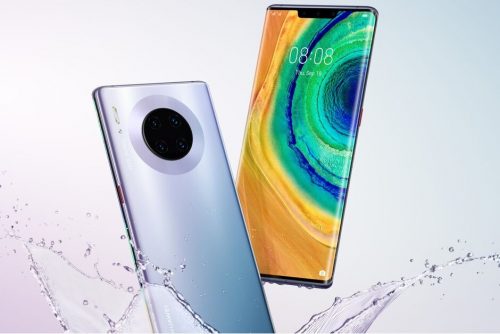
Huawei Mate 30

Camera Huawei Mate 30 Pro

Huawei Mate 30 Pro offers one of the most impressive cameras of 2019, where the phone along with the 40-megapixel Super Sensing camera on the P30 Pro, a 40-megapixel wide-angle camera is also called the company Cine, and can both cameras using the sensor 3D ToF Record videos with complete background isolation.

Camera Huawei Mate 30 Pro


Both cameras are relatively large, with the main camera having a 1 / 1.7 sensor and f / 1.6 aperture, while the Cine camera has a 1 / 1.54-inch sensor and an ultra-wide lens with f / 1.8 aperture.
The third camera on the back of the phone is an 8-megapixel camera with 3x optical zoom (80mm focal length) and 5x optical hybrid zoom, with OIS.

The video recording technology on the Mate 30 Pro is the most distinctive on Huawei phones, where the device supports 4K video shooting 60fps and support slow shooting at 7680 frames per second, and the most outstanding thing is the possibility of shooting 4K resolution HDR +.

3D facial recognition feature and remote phone control

Talking about the front camera unit of the Huawei Mate 30 Pro, we are in front of a high-resolution unit with a set of features that combine the most prominent features of the camera phones leading in one device. 

3D facial recognition feature and remote phone control


The front camera comes with a 32-megapixel camera, supports FHD + video recording (2288 x 1080 pixels) with support for a range of distinct shooting modes.

A new 3D scanner from Huawei introduces Face Unlocking technology, which has been improved more than last year to compete strongly with Apple's Face ID technology.

Also, Huawei has not abandoned the built-in fingerprint sensor at the bottom of the screen, but developed and improved to become faster than any other phone.

The surprise was the presence of a dedicated Gesture sensor to recognize gestures remotely, a blow to Motion Sense feature that Google is preparing to launch in Pixel 4 next month.

The presentation of the Mate 30 Pro included a review of this feature, with a hand gesture you can change music or switch pictures, as well as looking at the phone will automatically light up the screen and when you turn your face or close your eye will turn off!

Horizon Display

The Mate 30 Pro features a new 6.5-inch Horizon Display concept, with 88-degree curvature edges on both sides, leaving the leading Chinese manufacturer with no place for conventional volume controls. Activate them by double clicking on either side of the screen. 

Horizon Display

The new OLED panel also supports a standard 60Hz refresh rate and cross-screen audio that essentially eliminates the need for a traditional call headset, but the downside of this feature is the lack of a stereo speaker.

The screen resolution has also dropped from 3120 x 1440 pixels to 2400 x 1176 pixels, but this change could improve battery life.

Battery 

The Mate 30 Pro has a large 4500mAh battery that supports 40W super fast charging and 27W fast wireless charging. Like the Mate 20 Pro and the P30 Pro, the Mate 30 Pro also supports enhanced reverse wireless charging that is three times faster than before. 

Battery

Kirin 990 5G processor without Google services

The Mate 30 Pro is powered by the recently announced Kirin 990 5G chipset, and supports eight different 5G bands, while the Galaxy Note 10 Plus supports only three bands.

These chipsets are paired with 8GB of RAM and 256GB of internal storage that can be expanded via a nano-SD card.

Huawei will also provide 4G LTE version for those who cannot yet benefit from 5G services.

Huawei Mate 30 Pro comes with Android 10 pre-installed on the side of the new EMUI 10 interface, but the phone does not have access to Google Play services or any of the Google apps according to the previous news, which is not talked about Huawei and solutions have not yet.

Kirin 990 5G processor without Google services

Price and availability of Huawei Mate 30 Pro

Finally, the new Huawei flagship will be available for purchase in multiple colors including green, silver, purple and black, and there are two different versions of vegetal leather on the back instead of glass in green and orange.

The company has not set the release date and availability of the Mate 30 Pro yet, but the 4G version was announced at a price of 1099 euros (approximately $ 1200), while the 5G version was announced at 1199 euros (approximately $ 1326).

Do you want more applications and News ?


Thursday, September 19, 2019

September 19, 2019

IOS 13 Update: Full Features, Supported Devices, and Everything !


Apple officially announced the new iOS 13, which comes this year with many features and improvements at many levels to improve the experience of use on iPhone, iPad and iPod Touch. In this article view all the details of the new iOS 13!


new iOS 13

IOS 13 .. Better performance and smaller updates!

  • Face ID is 30% faster
  • Reduce app updates to about 60%
  • Applications are twice as fast at startup. 


Face ID is 30% faster


IOS 13 .. Night Mode finally came!

Night mode is finally available in iOS with iOS 13 update and on a very wide level throughout the system and its interfaces as well as on the main applications in the system: keyboard, messages, notes, maps, reminders, music and others. For more on the night mode in iOS 13 and how to activate it and the form of applications after activation.

 Night Mode finally came!

 Night Mode finally came!

 Night Mode finally came!

 Night Mode finally came!


Music application


  •  Night mode feature 
  • Show words and chronologically match the song you are listening to

keyboard

  • A new way of writing over dragging on characters is called Quick Path
  •  New fonts for in-app use are now available on the App Store 

A new way of writing over dragging on characters is called Quick Path


 Maps application


  •  Full map coverage of the United States with new features in view and location sharing
  • Look Around or Street View in Google Maps
 
 Maps application

 Maps application


Privacy

 There is a new privacy settings section in iOS 13. From which you can control which apps follow your location, give you a report of which apps are tracking your data in the background, as well as Wi-Fi and Bluetooth security features.

Also like Facebook and Google, you will be able to register to sites and services through your Apple account through the Sign in with Apple feature, which will create a new random account every time without disclosing any personal information about you.

Sign in with Apple feature

 Messages

 Memoji got new character options, added cosmetics and accessories to it and controlled all aspects of the characters. It is also possible to create stickers from them and will be available on devices running A9 processor and later.

Memoji


Photo and camera application

  • New Portrait lighting effect with intensity control 
  • New image editor interface in the system with new features like noise reduction and automatic optimization.
  • Enhanced video editor with new features such as the ability to rotate video
  • New improvements to the image view in Photos.
  • Photo app has the ability to remove repetitive images like screen shots.

Photo and camera application

Photo and camera application

Photo and camera application


Reminders program

  • The Reminders app has been redesigned for easy creation of tasks and appointments, arranging them into lists and further integrating with Siri. 

    Reminders app

     AirPods headphones

    • Siri can read incoming messages and the user can reply to them through the speakers. 
      Audio Sharing to share what you hear with someone else with AirPods. 
      AirPods headphones
       

    the battery

    • A new feature in iOS 13, known as Optimized Battery Charging, aims to increase long-term battery life by protecting it from overcharging.

    Gamers

    • If you are a gamer on the PlayStation or Xbox platform and have one in your home, you will be able to stream games to your iPhone or iPad and continue playing wherever you go around the house. IOS 13 also supports connecting your device to the Dual Shock 4 game controller for the PlayStation 4 or the Xbox controller.

    IPhone phones supporting iOS 13 

    IPhone phones supporting iOS 13


    iPadOS: The new name for iOS for iPad

    iPadOS is the new name for the iPad operating system and it carries all the basic features of the previously mentioned iOS system in addition to many other new features designed specifically for iPads, which include the following:

    • Add widgets to your home screen 
    • Run more than one window for the same application on the screen
    • Browse links by long press
    • Browse files stored on external storage devices when connected to iPad.
    • Floating windows feature: Some applications can partially appear floating on the screen while working on another application, and the floating application can be changed by dragging.
    • The File Manager application can browse files as columns.
    • File sharing via iCloud Drive
    • ZIP file compression and decompression
    • Improvements to the Safari browser to approximate desktop version: Download Manager, the ability to customize settings for a standalone site, control the font size, automatically optimize the sites to become more suitable for iPad
    • Accelerate the response to Apple's pen by twice.
    • External Storage Support: Now you can connect your USB flash drive, flash drive or SD reader to your iPad via USB-C
     
    iPadOSiPadOS

    IPads compatible with iPadOS

    IPads compatible with iPadOS

     IOS 13 / iPadOS update launch date

    There is a time plan to follow for iOS 13 / iPadOS updates, first for developers and then for Apple's beta subscribers.

    Do you want to watch the full Apple conference ?! 

    You can view the entire conference, which lasted for two hours and a third of the hour on the official Apple website through this link. The video contains the official review of all the things announced by Apple: iOS 13, iPadOS, watchOS 6 and other things.


September 19, 2019

Official iOS 13 update launch - how to properly update your device


 The iOS 13 update is now available to the public for download and installation on supported devices.In this article we will explain how to update to iOS 13 correctly to avoid any errors in addition to mentioning some of the features of iOS 13 update that you will enjoy immediately after the update, also we will respond to all Your inquiries.


Devices supported by iOS 13 update


- iPhone and iPod Touch:


The iOS 13 update for all iPhones currently running will arrive with the iOS 12 update except for three phones: iPhone 5s, iPhone 6 and iPhone 6 Plus. All newer versions of the iPhone will get an iOS 13 update.


For the iPod Touch, only the 7th generation iPod 7th 2019 will get the update.

IOS 13 update release date

IOS 13 update launches today (Thursday 19 September 2019)

Tip: It's best to wait and don't rush to download the iOS 13 update to avoid clicking on Apple's servers and ensuring the update is downloaded properly.

Important tips before updating to iOS 13:

  •  Update the apps on your device through the App Store or iTunes on your computer to make sure they are compatible with the new system and work on it without problems. By its developers over the coming days.
  • Remember the mail and Apple ID of the device, because you will need to enter it after the update.
  • Be sure to charge the battery, preferably 100% or connect the device to the charger during the update.
  •  Ensure the quality of your Internet connection (preferably over Wi-Fi).
  •  Make sure you have enough free storage space on your device (preferably 3 GB or more).
  • Take a backup of the content on your device, either through iTunes or iCloud.If the size of the backup is too large to use iTunes, this is an important precautionary step although the vast majority ignore it, and allows you to recover your data in case of any Problems with the new update.

An important step before the update for the owners of the beta version:

If you have the beta version of the iOS 13 update installed on your device and would like to update to the regular stable version, you must first unsubscribe from the trial program as shown in the images so that your device can receive the iOS 13 update normally.
  1. Go to Settings> General> Profiles
  2. Tap iOS Beta Software Profile
  3. Click Delete profile, so you will not receive any trial versions in the future.
  4.  Restart your device.   
 Unsubscribe from the beta before updating to iOS 13

Unsubscribe from the beta before updating to iOS 13Unsubscribe from the beta before updating to iOS 13
 

 How to back up (optional step) :

  1. . Through the iCloud :

    You can back up your files and data via iCloud, by going to Settings> iCloud> Storage & Backup> pressing the Back Up Now button at the bottom of the screen (prefer Way if your backup is small).

    Backup via iCloud cloud
    Backup via iCloud cloud
  2. . Through iTunes:

    • . With iTunes, after connecting your device to your computer, you can back up your applications and data. After clicking on your device in iTunes you will see all its information, make sure that in the Automatically Back Up section, the option is “This Computer” and not iCloud. Then click on the Back Up Now option in the same interface to make a backup and save it to your computer.

    Backup of iTunes

    Backup of iTunes

    • . The backup process will start, and the progress bar will appear at the top of iTunes. 
    • . After the backup is complete, you can make sure that the process is completed successfully by going to the taskbar in the program, pressing iTunes, then Preferences, then selecting the Devices tab from the window that appears, and you will see the backup is located in Device Backups and next to it It was taken. (This method is preferred if the backup is large)
    Backup of iTunes

 How to update to iOS 13 :

You can choose one of three methods, the first is suitable for everyone except those who have a jailbreak device, the second is easy and simple, the third needs some time and will return your device as you bought it the first time without your data and applications, i.e. all data will be erased and download the new system.

  1. . OTA antenna update from inside the device (the easiest and best way)

  • Turn on Wi-Fi
  • Go to Settings
  • Select the “General” or “General” tab
  • Then, Softwere Updates Software Updates
  • Select “Download and install”
  • It is recommended to connect the device to a power source (charging the phone).
** Note: This method does not cause the loss of data in the device, but also this does not replace the need to take a backup as mentioned above.


    2. Method 2 - Update through iTunes on the computer :

You can perform the update through the iTunes program via the computer is easy, as soon as you connect your device to iTunes, you will see a message alerting you to the possibility of the update, all you need to click on Download & Update the program will download and install the update automatically, and this method does not cause If you do not see the message, click Check For Update.

iOS 13 - Update via iTunes
** Note: This method also does not cause the loss of your data, however we recommend that you take a backup.


  3 - Method 3 - Manual update via iTunes :

(This method requires some additional steps, and deletes all content from your device)

This is the best method for those who own the jailbreak in case the previous steps of the update failed, and is done by downloading the update file manually (we will provide you links to download if available later) and is an file in the form of ipsw save the file on your computer, and this method will erase all Phone data so you should take a backup.

  1. Connect your iPhone or iPad to your computer while the iTunes app is running.
  2. Select Restore iPhone with Alt-click on your Mac, or hold Shift on Windows.
  3. A window will appear asking you to choose the location of the system file or the vermeer in ipsw format
  4. Select the update file you downloaded, which is an ipsw file (you can download it depending on your device type of links that will be attached in the article later).
  5. Installation is done manually.
  6.  After the update, restore the iTunes backup, by pressing the Restore Backup button. 
  
iOS 13 - Update via iTunes

iOS 13 - Update via iTunes


September 19, 2019

Google launches the function of memories in Google Photos .

Google Photos

Google has announced the launch of the Memories function in its Photos app, reminding the user of past moments.

The Google Photos app automatically provides thumbnail albums, which are displayed by algorithms in the wizard tab, and under the slogan "Show what I did a year ago", Google's AI function displays the best images of the day in question.

Instead of sporadic memories, the current update creates a more organized version of the memory function, and Google will not create albums on the top edge of the screen under the Photos tab, which will be replaced by the Memories tab.

The memories function works similar to the Stories function in Instagram. When you click on the Memories tab, the thumbnail albums open in a Story-like presentation in Instagram.

Google's choice of images relies on machine learning. Algorithms always display the best images, such as when a user laughs or the sun shines. Because the user may not want to remember certain situations or people, they can create instructions or turn off the memory function completely.

The company extends the sharing function within the app in order to share memories with friends, so a kind of chat history is set up with the people to whom the photos are sent.

Tuesday, September 17, 2019

September 17, 2019

Vivo announces Nex 3 5G without buttons and with a 64-megapixel camera.

After months of leaks and suspense, VIVO officially announced the launch of its newest smartphone, the Nex 3 5G, which, like previous versions, has unique features that may not exist in any other smartphone.

vivo nex 3


The new (BX3 5G) from the Chinese company offers a curved screen on both sides, in addition to three rear cameras, and the phone is distinguished - and this is clear from his name - that it supports 5G networks.

Vivo unveiled the initial concept of the phone as Apex Concept last March, one of the most prominent features of the phone is that it completely abandon the buttons, as it relies on touch sensors to perform the function of the power button, volume change buttons.

To make the phone screen curved from the sides to the back, Vivo said: It used Samsung's OLED plastic screens. According to the company, the screen covers 99.6% of the phone interface. The company also said: The phone has a brightness level of 800 lumens while minimizing the harmful blue light.

As for the rest of the specifications, the phone comes with a screen size of 6.89 inches and accurately 2256 × 1080 pixels, and offers random access memory (RAM) size of 8 or 12 GB, and internal storage of type UFS 3.0 and a capacity of 256 GB.

The phone has a Qualcomm Snapdragon 855 processor. Its three rear cameras are 64-megapixel with f / 1.8 aperture for the first, 13-megapixel for 120-degree wide-angle with f / 2.2 aperture for the second, and 13-megapixel with f / 2.48 for aperture. Depth. The phone's front-facing camera is a 16-megapixel one with f / 2.09 aperture.

It has a 4,500 mAh battery and supports 44W fast charging. Programmatically, the phone runs version 9 of the Android operating system with the Vivo Funtouch OS 9.1 user interface.

It is noteworthy that vivo plans to launch a version of its new phone does not support 5G networks. The new Nex 3 5G will be available in the coming months in Asia Pacific and Southeast Asia. No information on the price of the phone.

vivo nex 3

Check out new topics for more


September 17, 2019

Apple's Arcade games service is now available .. Will it succeed?


Apple's Arcade streaming service is now available to give users early access to the gaming service three days before its official launch on September 19, but this service is entering a crowded market full of subscriptions.


As of September 16, users of the public beta of the iOS 13 operating system can sign up for a month's free subscription.


The service was first announced in March and costs $ 5 a month and is available for iPhone, iPad, iPod touch, Mac and Apple TV.


To date, the company has announced the availability of 54 games for this service, with 100 to be supported by the end of this year.


The service will be officially launched on Thursday in more than 150 countries, when the official version of iOS 13 will also be launched.


The 100 games that will be in service will range from "child-friendly" to "best for adults", and the company says it will not cost users extra money after downloading them, covering a wide variety of games and play styles "so everyone can find the games they love. ".


Apple's entry into subscriptions is not surprising, as it currently earns about 20% of its profits from services.

Apple CEO Tim Cook said last year that although the company had made its name from the sale of products - iPhone, iPad, Mac and AirPods - these new services would become the next big thing for the company.

What is Apple betting on the success of its service?
When it comes to gaming, Apple says it plans to offer something different.


Currently, competing services have plenty of classic games to win subscribers, but Apple has taken the unusual step of pushing developers to create more than 100 exclusive games for Apple Arcade, and using its money to fund these games shows how the company wants to move forward with this business model. Subscriptions.


In addition to funding the development of exclusive games for its service, Apple focuses on its new family-based service unlike other subscription services, allowing up to six family members to play ad-free games on iPhone, iPad, Mac or Apple TV offline. .


In addition, Apple has decided to stay away from the nostalgia of other subscription services and focus on new original content, for example, Netflix shows old series popular as the series "Friends".


Game services prefer to offer classic games flirting with the past, such as Assassin's Creed, which allows players to roam in ancient Egypt, medieval Italy or colonial America.


In contrast, Apple is betting on the new, in the services "Apple TV Plus" and Apple Arcade "The company depends on the original offers and games.
September 17, 2019

Huawei Mate 30 , Evan Plus leaks photos and revealing details.

Huawei is planning to launch its new Huawei Mate 30 phablet on October 19, and appears to be mainly geared to compete with the Samsung Galaxy Note 10.


But the new Huawei Mate 30 will face a number of difficulties and on top of that it will be deprived of Google services in addition to the operating system Android, so Huawei focused on the attractive design and specifications of this phone.

For his part, the famous blogger and leaked Ivan Blas published during the past few hours a group of pictures of the phone Huawei Mate 30 models Mate 30 and Mate 30 Pro and then Mate 30 Lite and Mate 30 Porshe Desog.